Showing posts with label programming. Show all posts

Sunday, February 17, 2008

Arduino or PICAXE?

This is a pretty geeky post... You've been warned.

Among the courses I teach is electronics. It is a one semester course, where we cover basic theory in the first half of the semester and students breadboard circuits for the second half of the semester. I inherited the course and its general structure from the previous electronics teacher and it seems to work pretty well.

Anyway, I've been thinking about changing it. I've been wanting to incorporate microprocessors into the course for some time, but I've been daunted with either the price tag or for the cheap stuff with the technical know-how that I just don't have. By bringing in microprocessors I can also get students doing some programming . Additionally, a lot of electronics these days includes embedded microprocessors.

Enter the PICAXE and Arduino micro-controllers. Both can be had relatively cheaply and are fairly easy to program. Unfortunately I discovered these at about the same time. If I only knew about one of them I'd have been content to buy a bunch and get to work redesigning my course. As it stands right now, I have no idea which one to choose. So I'm writing this post to get my ideas down and I'm partly hoping for some insight from potential experts.

PICAXE: The PICAXE micro-controller is a Pic based chip that has a bootloader loaded onto it allowing for a very simply programming cable to be used. It can be programmed using a form of basic or with a flow chart based interface. There are some great guides online for its use, but they'd have to be edited a bit to make them usable for my course. There are multiple versions of this chip with different numbers of inputs/outputs. The programming is slightly different from chip to chip.

Pros: Cost. The chip (8M) itself costs less than $4. Theoretically students could easily make permanent projects with this. Basic programming: I know basic and basic programming is relatively easy.

Cons: The 8M, the chip I'd focus on, is a bit limited. There are other chips we could add in, but their structure is different. Apparently limited availability. I'd really have to plan ahead to ensure I had the supplies I'd need (unless I want to order from the UK). Windows only.

Arduino: This board is really a Basic Stamp replacement. I'd thought it was going to be outside of the price range I'd set for the course, but then I found a supplier who supplies a version that I can get for $11/board in bulk. The programming for this chip is in a C++ like language. There is also a lot online support for this board and at least one project designing a course in basic electronics with the Arduino as the platform.

Pros: Expandability. This chip has some wickedly cool potential. It interfaces circuitry directly with a computer easily, making it possible to create circuits that control or respond to functions on the computer. Support for Mac, WinXP, and Linux.

Cons: I don't know C++ or any other object oriented programming language. More expensive so it would cost more for students to make permanent projects.

I guess the bottom line is the PICAXE is probably simpler to start using but while the Arduino has a steeper learning curve at the start it allows for more advanced functions more easily. At least I think. Right now I'm leaning towards the Arduino. I've already got one independant student working with the PICAXE. I'll get a couple working with the Arduino this semester as well and see what they all think.

Wednesday, July 25, 2007

Fun with Scratch

Unless you've been under a rock you've probably already heard of Scratch it's been all over the internet lately and made a huge appearance at the NECC. Scratch is a simple, intuitive programming language for kids. You lock together blocks of code like you put together legos.

Anyway, it really is a lot of fun. When I described it to my 9 year old son he was not interested at all. When I showed it to him, however, it was a different story. He can't wait to share it with his friends and cousins.

I could describe it to you, but it a demonstration is much cooler.


If you're interested you can download a much higer quality version from the archive.org

Wednesday, August 16, 2006

Use of Programming in Non-Programming Classes

I believe programming is one of the more useful skills we can teach in high school today. This is why I've been looking around for fun and easy to use programming languages (that and I want to make sure my son knows the basics of programming). Both Squeak and StarLogoTNG have potential and I will be looking for ways I can use them in my classes this year. I also will continue to have my students write simple programs on their graphing calculators.

Another area you may interject some programming is a web design type class. It would be very easy to incorporate some java script.Many people believe that html code is a programming language. While it has some similarities with programming it is simply a mark-up language. Java Script can be imbedded within html code and can speed up the web design process. Newer web design technologies are becoming incresingly dependant on the ability to program.

You may be asking yourself why I believe programming to be so important. When I was young I learned the basics of programming and that has allowed me to use computers much more effeciently. For example, when I found out youd could write simple If-Then statments in Microsoft Excel I was off and running. I didn't need to look up how to do it. Simply knowing I could do it was enough. Understanding the basics of programming structure made it easier for me to grasp many concepts in math more quickly as well.

I've only ever learned Basic and Fortran, but both have made me approach problem solving differently and gave me the confidence to slog through html and kml codes. Neither html nor kml are strictly programming languages, but the confidence granted by knowing some programming makes approaching both easier. Hyper Text Markup Language (html) is used for formating webpages and Keyhole Markup Language (kml) is used for creating content for Google Earth.

If students are going to participate in the read-write web they don't need to know how to program. But, if they do there are many more doors open.

Next I'm going to jump into Second Life. As I understand it you can create your own objects and code their behaviors. This could be yet another fun way to introduce students to programming.

Technorati Tags: , ,

Tuesday, August 15, 2006

Easy Programming Part 2 - Star Logo TNG

A week or so ago I blogged about Squeak and mentioned I'd be mentioning another easy programming language. Well, here it is. Star Logo TNG is a 3D implementation of Star Logo. This is my first experience with Star Logo and I have to say it is pretty fun.

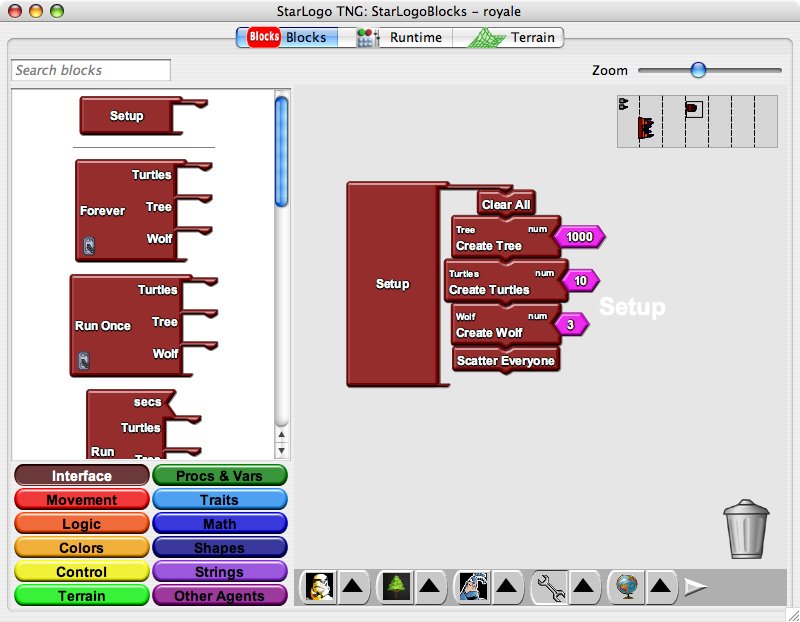
I know Star Logo goes way back in education, but I've never used it before so I can't comment on it. Star Logo TNG is very easy and is visual. You simply drag the blocks that you want and lock them together like puzzle pieces. Not all pieces will fit together, so you can't implement code that has no chance of working.

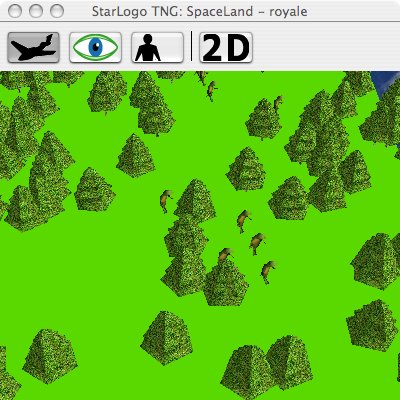
I worked through a couple of the tutorials before really putting it through it's paces. It helped that I've programmed before as the tutorials are not the best. I ended up trying to model the relationship between trees, moose, and wolves on Isle Royale so I wouldn't need EcoBeaker if I ever teach environmental science again. It is pretty cool as there are already 3D models of trees and wolves. There were no moose like animals so I just went with the default turtles.

It wasn't too bad. I was able to get it to run and you can even generate graphs of the number of various critters you have. I did manage to see the classic predator-prey graph. I did run into a couple of problems. The bots move to fast. They seem to be more teleporting than moving. Additionally, once you have lots of bots to keep track of the program became very unstable. Too unstable to use this particular program in a classroom setting. I may have to try implementing it in the older 2D Star Logo.

I ran this on both my MacBook (1.83 GHz, 512 RAM) and my WinXP Desktop machine (3 GHz P4, 512 RAM, 256 Video RAM). I seemed to have the same stability issues on both machines.

Technorati Tags: , , , , , ,

Thursday, August 03, 2006

Easy Programming - Part 1, Squeak

I remember growing up and being able to type in Basic Programs on computers and type run and they would. It was really easy as the Basic programming language was integrated into the operating system. While my brothers and I were in elementary school (4th and 5th grade) we'd walk up to a display computer in K-Mart and type in a program to fill the screen with our names. It was easy and fun.

Today, programming is much more difficult. You need some sort of program to compile your program into a form that will run. Entering into programming today is much more daunting then it was when I was young.

I've been playing around with a couple easy to use tools to help teach programming visually. I really want to get my son (whose entering 4th grade this year) into programming. There are a few tools out there that allow programming by dragging and dropping blocks that lock together to build a program. This allows novice programmers to write simple programs very quickly while learning the basics of programming structure.

I keep waiting for a language called Scratch to be released, but the release date recently changed from "this summer" to "later this year". So, as Scratch isn't available yet I downloaded Squeak instead.

I turned my 8 year old son loose and he had a lot of fun. I found some cool projects at Squeadland specifically designed for kids. In a very short amount of time he had created a small car programmed it to drive around the screen, then he added a steering wheel in-order to control it himself. He really enjoyed playing with Squeak. My next task will be to challenge him a little. Maybe make the car turn the opposite direction he steers or drop him into the other sample projects from the site.

I did run into a couple of finicky bits, but for the most part Squeak is really easy to use and can be a lot of fun.

Technorati Tags: , , ,