Showing posts with label environmental. Show all posts

Monday, July 21, 2008

GIS - Geographic Information Systems

I taught Environmental Science a number of years ago and I came across all of this then. Some of this material may be a little outdated. I will be working on it this summer to help out a good friend of mine who will be teaching Environmental Science this year. GIS, or Geographic Information Systems, is basically taking data and plotting it on maps. By mapping the data it is often much easier to spot patterns or trends. In education GIS can be a perfect tool for inquiry based labs.

The simplest GIS activity I've ever done with my class was to pass out maps of South East Michigan that I'd gotten from the Secretary of State or the Department of Transportation (I can't remember which). Then in groups of trhee I had students use markers or crayons to trace all th rivers and streams. By highlighting this data students were able to quickly identify the different watersheds in our area. We live in the Rouge River Watershed which covers a large area and funnels down to one very polluted river. Once the watershed was "outlined" in this way it was easy for students to understand why it is still so polluted even given all the programs aimed at changing this.

GIS becomes even more powerful when we bring the power of computers to bear. Below are listed some free programs for analyzing data. The easiest is probably Google Earth, but I highly recommend giving ArcExplorer a try.
I created this map as an example of some of the cool questions you can ask. It was created in ArcExplorer using data from the 2006 CIA World Fact Book. The highlighted countries have more than twice as many active cell phones as traditional telephones. This is really cool, it demonstrates how many developing countries are leap-frogging technologies and not even bothering to build the infrastructure necessary to support more out dated traditional phones.

Cross posted from www.flosscience.com

Tuesday, July 31, 2007

Summer Meeting Postmortem

If you read my blog you'll know that I went to and presented at the National Educational Computing Conference (NECC) earlier this summer. A couple of my posts this summer were about my own session and I did manage to post about a couple of the other sessions I attended. In addition to the NECC I also got to go to the Lemleson-MIT Inventeams Odyssey. At both of these events I learned more from the conversations I had with other educators than I did through any organized activities. Don't get me wrong, I also learned a lot from the sessions I attended and from talking with vendors, it's just that I leaned more through informal interactions.

The main reason this post didn't happen right after the NECC is that I've been spending time investigating the resources I learned about in my conversations with others. So, what did I learn:

In Boston (at MIT):
  • I met, Stephen Scannell, the president of the Oregon section of the American Association of Physics Teachers and we traded emails and lesson ideas. We'll be sharing more over the years to come I'm sure.
  • I also made a contact with Steve Meyer, who is a teacher and a distributor for the PICAXE micro-controller. The PICAXE is an inexpensive, easy to use micro-controller and is perfect for a lot of really cool electronics projects. Until recently, the only distributors I knew of were located in Great Britain.
  • I also learned about Project Lead the Way. I need to spend some more time looking at this to see if it might be right for my school.

In Atlanta (at the NECC):
  • I had a great, although brief, conversation with Carolyn Staudt from the Concord Consortium. They have some truly great stuff. They develop research based lessons and lesson plans and then do the research to determine the efficacy of their stuff. If you teach science or math you really should spend some time going through their site. They have lessons and resources that can be used by educators at every level. My favorite is a collection of tools for DIY probeware.
  • My table was right next to the Vernier table at the Math/Science Playground so I got to talk with Rick Sorenson, their representative, quite a bit. He pointed out some different ways to use LabPros so that the LoggerPro software doesn't do all the work for the students. By default, LoggerPro sets itself up in the most user friendly way. This is often not the best way to ensure students learn, however. I find students learn more when they have to think about and analyze the data for themselves. By default LoggerPro does most of the analysis for you making it easy to run through a lot of labs very quickly, although in a very superficial way. After talking with Rick I learned that it doesn't have to be this way, apparently I can have my cake and eat it too.
  • As a presenter I had access to "Presenters World". It sounds much cooler than it was. It was a room with tables, internet connections, available plugs, and a printer. We could also store stuff so we wouldn't have to lug it all over the convention center. While spending a little down time recharging my laptop I met Scott Garrigan. He had run a workshop on free/opensource resources for education. So, I asked him for the 5 minute version of his session. He pointed me at:
    • Breve - An opensource 3D simulation program for creating artificial life. He recommends it particularly for its potential to teach concepts in evolution and genetics.
    • Teragen - A free landscape generator. You can use this to create photo-realistic landscapes. The you can then cause erosion to happen and talk about how land changes over time. It is also possible to take topo data of real places and create them.
    • NetLogo - This is what I was looking for last summer. I will be spending much of August playing with this to see if I can use it in my classes. "NetLogo is a cross-platform multi-agent programmable modeling environment." There are lots of great models out there already, including some that I would use to replace EcoBeaker (assuming I every teach Environmental Science again). I will be spending time see how I can create new models or modify existing ones to teach the lessons I need to teach.

Sunday, May 13, 2007

Africam

I discovered this quite some time ago and realized I never blogged about it. There are literally thousands of webcams out on the internet. Most of the cams I've found only netcast still pictures that update periodically, but the Africam has a live video feed complete with sound. It tends to be a bit quirky, but once you get it open it's pretty cool.

As near as I can figure, the cam is near a lodge of some kind (I saw it once in the feed) and is controlled from there. Being in Africa it is probably in a different time zone. So far I've seen the best stuff between 6:00 and 9:00 a.m., I'm in Eastern Time Zone (not sure what the comparison is to GMT). I've managed to see a number of different bird species, antelope, warthogs, monkeys, lions, and this morning I saw an Elephant.

The Africam site has a number of other webcams as well, but they are only still pictures. For the video feed just click on Nkorho Stream near the top left corner.

I haven't used this in class yet as I've only been teaching physics and electronics since I discovered it, but the next time I teach Environmental Science I will. My current plan is to have students monitor the cam and blog about what they see. Each student would be responsible for a different day so that we could get daily, or nearly daily updates. This should give us a rough estimate of the biodiversity of the region.

Sunday, February 25, 2007

Cheap Tech Tool: Non-Contact Thermometer

I recently purchased a non-contact thermometer from Harbor Freight Tools. I think I may be buying a few more. You just point it at a surface, push a button and a second later you have your temperature reading. In a matter of seconds you can compare the temperature of a window, window pane, and the wall surrounding the window. Or you can look at the temperature of the floor by an outside door and how it varies with distance from the door.

The one I've been playing with currently is running for $6.99 (I bought mine for $9.99). It has a temp range of -33 to 110 degrees C (-27 to 230 Deg.F) so is a little limited and I haven't been able to gauge it's precision yet. Its ease of use and price make up for any of it's shortcomings, however.

Possible Labs or Demos:
  • Black absorbs heat more quickly, does it radiate more heat than white?
  • Insulators and conductors - Both may be the same temperature, but do they feel the same when you touch them? A piece of Styrofoam and metal fresh from the fridge or freezer would do nicely.
  • You can replace melting wax on the ends of conductors with a quantifiable temperature.
  • Resistors in a circuit, which ones get the hottest? Why?
You can get much more expensive non-contact thermometers that have wider temperature ranges and use lasers to show the exact spot the reading is coming from, but I have yet to find a cheaper one.

Tuesday, August 15, 2006

Easy Programming Part 2 - Star Logo TNG

A week or so ago I blogged about Squeak and mentioned I'd be mentioning another easy programming language. Well, here it is. Star Logo TNG is a 3D implementation of Star Logo. This is my first experience with Star Logo and I have to say it is pretty fun.

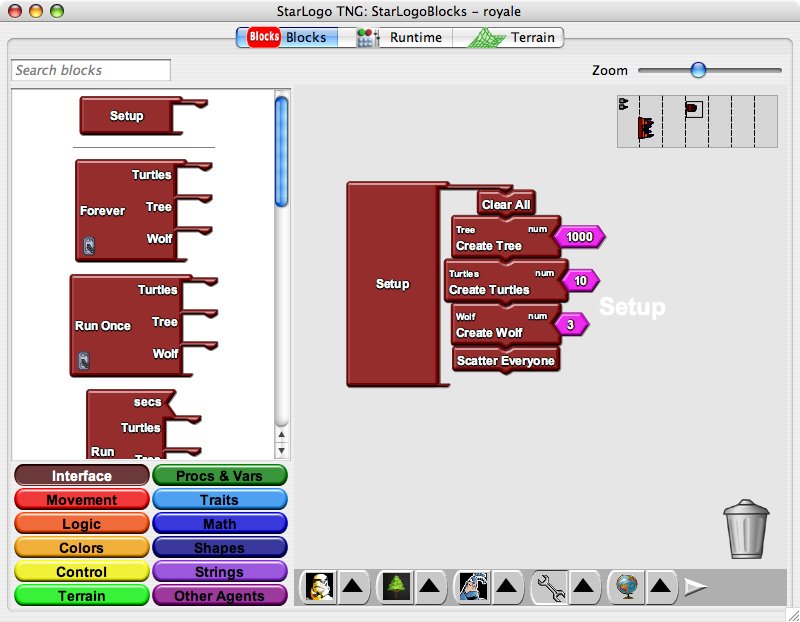
I know Star Logo goes way back in education, but I've never used it before so I can't comment on it. Star Logo TNG is very easy and is visual. You simply drag the blocks that you want and lock them together like puzzle pieces. Not all pieces will fit together, so you can't implement code that has no chance of working.

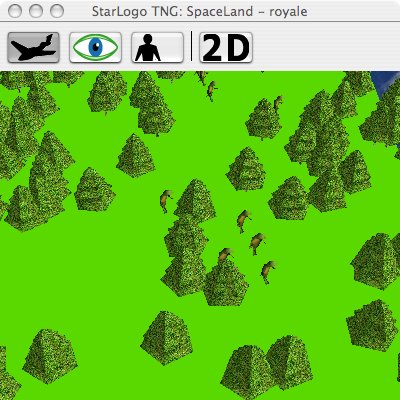
I worked through a couple of the tutorials before really putting it through it's paces. It helped that I've programmed before as the tutorials are not the best. I ended up trying to model the relationship between trees, moose, and wolves on Isle Royale so I wouldn't need EcoBeaker if I ever teach environmental science again. It is pretty cool as there are already 3D models of trees and wolves. There were no moose like animals so I just went with the default turtles.

It wasn't too bad. I was able to get it to run and you can even generate graphs of the number of various critters you have. I did manage to see the classic predator-prey graph. I did run into a couple of problems. The bots move to fast. They seem to be more teleporting than moving. Additionally, once you have lots of bots to keep track of the program became very unstable. Too unstable to use this particular program in a classroom setting. I may have to try implementing it in the older 2D Star Logo.

I ran this on both my MacBook (1.83 GHz, 512 RAM) and my WinXP Desktop machine (3 GHz P4, 512 RAM, 256 Video RAM). I seemed to have the same stability issues on both machines.

Technorati Tags: , , , , , ,

Thursday, July 27, 2006

Cool Ecology/Evolution Simulation Software

While preparing for the COATT workshop I led this week I was digging through old technologies I've used in the past. One great program I've used before is EcoBeaker. It's not free, but you can download a free demo. The demo is fully functional but will only run for 21 minutes at a time and won't let you save.

What does it do? Well, it includes a number of pre-generated simulations to cover such subjects as: classic predator-prey, competition, biological control, heterozygote advantage, keystone species, and energy flow in an ecosystem (among others).

I've only used the Isle Royale simulation. This model investigates the relationship between moose and wolves in a closed system. However, my students did modify the model to include more species (low growing brush, rabbits and foxes) to investigate more indepth relationships. All the variables can be changed. I mean all the variables. You can simulate just about any model you'd find in a college level ecology book (if you were so inclined).


The best part was watching the students while they were using the model. The loved being able to actually see the wolves and moose in the habitat. They also begin experimenting themselves. Granted, some of this was pretty superfluous, but they were asking their own questions and getting the answers to those questions very quickly.

From what I saw of EcoBeaker and its effects on my students I'd say it was well worth buying (currently they are updating their prices, so have none online). If I still taught Environmental Science I know I would either whine at my Department Head until she gave me the money for it or find a grant to buy it. (I want to say it was in the $500 range when I looked a couple years ago).

Technorati Tags: , , , ,