Showing posts with label probeware. Show all posts

Sunday, July 01, 2007

My Stuff from the NECC

Well, as of this morning my handouts still haven't appeared on the ISTE-NECC site for my session, so I've converted my pdf files to jpg and uploaded them to Picasa Web Albums (owned by Google).

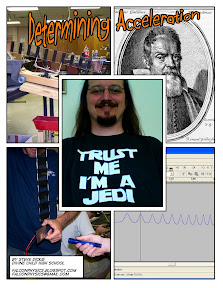
Here are all the handouts I had posted to the backboard behind my table. I created them using Comic Life on my MacBook.
I also have them as pdf files. If you'd like a copy of the pdfs just shoot me an email and I'll send them along (falconphysics@gmail.com)

You may also want to see my step by step instructions over on instructables.com

Tuesday, June 26, 2007

Now I can Relax

Well, I survived my marathon presentation today. I was at the Math/Science Playground at the NECC from 9:00 am to 4:00 pm. It was a long day, but I met lots of great people and made some good contacts, which is what this is all about.

Here are the links I promised people would appear on my blog:

I'll try to put up a more comprehensive posting tomorrow. I'm wiped out today.

Thursday, June 21, 2007

Real World Applications

I have the privilege of having a dedicated team of students who are presenting their invention at MIT this week. They were one of 20 high school teams to win a Lemelson-MIT InvenTeams Grant to create an invention. It was a long arduous process that changed form along the way, but we're done.

This week is the InvenTeams Odyssey, which is being held on the campus of MIT. All 20 teams are here to show off their inventions and replenish their excitement and enthusiasm for science, engineering, and invention. I'll leave it to my students to tell you about their project. I filmed their presentation and you can see it below.

I also want to encourage other teachers out there to seriously consider applying for this outstanding program. Teams apply for grants of up to $10,000. The money can be used to buy supplies needed for the invention process including building materials as well as food for meetings. Additionally, up to $2,000 of the grant can be used as a teacher stipend. The initial round for application is in the spring (sorry I didn't post earlier) with the best of those being invited to submit a final application in the fall. Look for it next year, it is an outstanding program.


Wednesday, June 13, 2007

Me at the NECC

I've been hurriedly getting my stuff together for the upcoming NECC. I'd be doing great as far as time goes if it weren't for the fact that I'm also working with a team of students who are trying to finish their invention project. They won a Lemelson-MIT InvenTeams grant and will be presenting their project in Boston from June 19th thru the 23rd. I'll be going with them, which will be cool, but I'm running out of time!!!

Any way, on with my stuff. I've been uploading directions to Instructables.com. This site is pretty cool and they have a competition running right now where the best project wins a laser cutter. While I don't think I'll win the laser maybe they will send me a free T-Shirt. Although if I do somehow with the laser cutter the science club next year will have the best fund raisers ever.

Below you will find links to the projects I've submitted so far. I will have at least one or two more to put up yet before I'm ready for Atlanta.
I've been contemplating ways I can use Instructables in class. I've used some of the projects either for demos or student projects, but I haven't had students upload their own yet. Their had been a problem with the Instructables web site and our network firewall, but this seems to have been resolved. Next year I'll have to use this. I just have to figure out a good way that won't swamp the site with 90 projects for the same thing.

Friday, March 16, 2007

Me at MACUL


This year I presented. I ran a hands-on workshop entitled probeware with almost no budget. My handouts are on my wetpaint site, as usual.

Abstract: Learn how to make your own probeware for under $10/station that will allow you to do multiple labs in physics/physical science and how to use the free software to make it work. You will use homemade probeware to analyze sound, investigate gravity/acceleration, and periodic motion.

Even given a minor snag or two, it went better than I could have hoped. We managed to cover all the topics I'd planned plus one or two extra. All the participants got to make and take their own solar-cell based probe and nobody burned themselves with the soldering-iron.

Sunday, February 25, 2007

Cheap Tech Tool: Non-Contact Thermometer

I recently purchased a non-contact thermometer from Harbor Freight Tools. I think I may be buying a few more. You just point it at a surface, push a button and a second later you have your temperature reading. In a matter of seconds you can compare the temperature of a window, window pane, and the wall surrounding the window. Or you can look at the temperature of the floor by an outside door and how it varies with distance from the door.

The one I've been playing with currently is running for $6.99 (I bought mine for $9.99). It has a temp range of -33 to 110 degrees C (-27 to 230 Deg.F) so is a little limited and I haven't been able to gauge it's precision yet. Its ease of use and price make up for any of it's shortcomings, however.

Possible Labs or Demos:
  • Black absorbs heat more quickly, does it radiate more heat than white?
  • Insulators and conductors - Both may be the same temperature, but do they feel the same when you touch them? A piece of Styrofoam and metal fresh from the fridge or freezer would do nicely.
  • You can replace melting wax on the ends of conductors with a quantifiable temperature.
  • Resistors in a circuit, which ones get the hottest? Why?
You can get much more expensive non-contact thermometers that have wider temperature ranges and use lasers to show the exact spot the reading is coming from, but I have yet to find a cheaper one.

Sunday, November 19, 2006

Instructables

I've been enjoying many of the projects on Instructables from some time. Today I contributed my first project.

Instructables is a site for people to "share what they do and how they do it." It is an incredible site. There are projects on nearly any subject you can think of including: cooking, electronics, robotics, catapult making, programming, paper airplane making... the list goes on and on. Anyone can see them, but if you create a login ID you can comment on the projects or ask questions of the project creators. A login is also required to submit your own projects.

The project submission process is no more complicated than writing a blog entry and there is the possibility to collaborate on projects through the site, although I haven't tried this yet. Even if you don't use the collaboration tools on the projects, the ability to leave and receive comments can lead to an informal collaboration. Within a few hours of posting my project it had already been commented on and I was able to elaborate a bit to make everything more clear.

My project deals with the creation of the solar cell probeware I've outlined previously. In the future I'll be adding more instructables detailing how to use the probe and software (Audacity and Visual Analyser) for a variety of lab activities or teacher demonstrations.

I'm considering incorporating this site in future student building projects. I've already referenced it for my electronics students and some students searching for good science fair projects.

Technorati Tags: , , ,

Tuesday, October 24, 2006

MDSTA - Fall Meeting

Last weekend was the fall meeting of the Metro-Detroit Science Teachers Association. It's a great meeting that I've been lucky enough to present at the last few years. The sessions are good, the dealer room isn't bad for such a small conference and the MESTA (Michigan Earth Science Teachers) put out an incredible spread of rocks, minerals, and fossils for really low prices every year.

I presented on Cheap (Nearly Free) Probeware. You can find out more about what I did at my wiki conference handout. I showed off the HOBO stuff (a great relatively inexpensive probeware solution) and went through my DIY version of cheap probeware. The participants even got to make there own to take home. I'll try to put up a video tutorial soon (grades are due this week, so soon is relative).

I've been using wetpaint.com (a WYSIWYG wiki) as a way to set up easy to manage webpages for meetings I've been presenting at this year. I'll keep adding to it as I go. There's starting to be a lot of material there.

I find it's easier than a traditional webpage. There's no worries about where to host it, I can work on it anywhere, and I can open it if I want to let conference goers add anything.

Technorati Tags: , ,

Saturday, October 14, 2006

MiAAPT - Fall 2006/07

For the full details of my presentation check out my online handout at scienceeducation.wetpaint.com

Title: Probeware on a budget - sneaky uses for free software.

Abstract:
You can actually outfit a computer with probeware capable of doing a dozen different labs or demos for under $10. If you can attach a solar cell to a cheap set of dollar store headphones you have all the technical skills you need. All you need to make it works is a sound card with a microphone jack and you can find g, determine the relationship between the period and length of pendulum, or create your own inertial balance.

I'll be presenting a more detailed version of this talk at next week's meeting (10/21/06) of the MetroDetroit Science Teachers Asociation meeting being held at Lawrence Tech. For that presentation I'll wlak participants through the actual process of creating the probeware and then show several labs that can be done using the probe. Today I only have time for one or two.

The Software:
  • Audacity: An open source program for audio recording and editing. It is available for Windows, Mac, and Linux.
  • Visual Analyser: A free oscilloscope program for Windows. I've seen $50 programs that don't do as much as this free one.
  • MacScope: A sharware oscilloscope program for Mac or Windows. You can download a fully functional version for free and if you like it you only have to pay $10 to buy it.

Technorati Tags: , ,

Monday, October 02, 2006

More on the HOBO g-pendant

I posted about the new G-Pendant from the HoboDepot last week. I showed an experiment some of my students were conducting relating to the benefits of shoes for absorbing shock rather than transferring it to your knees and back.

The maximum g-force on the graph was above 5 g's (The maximum possible reading is 3 g's in any one direction). We were graphing the sum of the three axies rather than just the x direction (straight down). Birch, a retired physics teacher pointed out we may have been maxing out the pendant in one of the component directions. Well, he was right. We went back and analyzed the data today and found with no shoes we did max out the g-force in the x-direction. With shoes we only maxed out for a few of the steps.

We played some more and found it is hard to keep under 3 g's. With this limitation it is still possible to do some good labs.

We put the sensor on the inside edge of a roll of masking tape and rolled it. You have to roll it really slow to avoid maxing out centripetal force. However, it is easy to see when each rotation happens. So, we rolled it down a ramp and were able to calculate acceleration. With a roughly 20 degree angle we were able to estimate acceleration to an acceptable 10% error. Any steeper and we would have maxed out too fast to collect any usable data (we'll confirm this later).

Tomorrow I'm going to have them do periodic motion, both pendulum and bouncing on a spring.

In case you're wondering. I have a few highly motivated students who have eighth hour off and like to hang out in the physics room (who doesn't really?), so I've put them to work.

Technorati Tags: , ,

Thursday, September 28, 2006

Way Cool Probeware

I just managed to acquire more HOBO data loggers. Now I need to play with them so I can demo them at the meetings I'll be presenting at in October (DMAPT Oct. 3, MDSTA Oct. 21, and hopefully MiAAPT Oct. 14). I've played with some of their other products before and have been impressed with their ease of use, portability, and affordability. Now I'm even more impressed.

About a year ago Onset Computers and the HOBO Depot released their first pendant logger, which measures light and temperature. The pendant loggers are fully sealed and waterproof. They communicate with the computer through an optical coupler plugged into a USB port. There is a magnetic switch inside the pendant to tell it when it is in the coupler. The switch can be used, with a magnet, to trigger the logger to begin taking data.

The basic HOBO interface is easy to use and quick to master. You plug the HOBO into the computer and then use the HOBO software to configure the logger. You "launch" the logger and put it somewhere you want to record data. The logger will collect and store data until its memory is full or you connect it to the computer again. The data are stored and plotted. The data can also be exported into Excel or another spreadsheet to be analyzed.

Until recently the main focus of the HOBO loggers has been environmental (light, temp, humidity). The newest logger is aimed squarely at physics. The new pendant measures acceleration/gravity. It contains a three axis accelerometer and is capable of collecting data much more quickly than the older loggers. The g-pendant can take up to 100 samples per second. The older loggers won't log data faster than once a second.

G-Pendant Stats:
  • Max 3 g in any one direction (very easy to max out)
  • Should survive a drop from 3.5 m
  • Accuracy: 0.753 m/s^2
  • Operating range -20 Deg. C to 50 Deg. C
  • Submersible up to 30 m
  • Weight 18 g
  • Cost - Complete Kit: $99 (until January), Individual Pendant: $69 (volume discount available)
I put the G-Pendant in the hands of a couple students I had in physics last year to see what they could do with it. After extensive training (about 2 minutes worth) they were off and running and having lots of fun. Below you can see the results of one of their experiments.

Technorati Tags: , ,

Saturday, September 23, 2006

HotWheels Radar Gun Take Two

A couple of weeks ago I blogged about the Hot Wheels Radar Gun. When I looked through my traffic for the last week (using Google Analytics) I saw "Hot Wheels Radar Gun" pop up as the most common search terms leading readers to my blog. So I decided I should probably conclude my testing to determine if it works.

After my last installment I had the feeling that it worked for constant velocity. I have confirmed that it works surprisingly well. I still need to experiment with accelerating objects though.

Experiment #3: Velocity of a constant velocity car


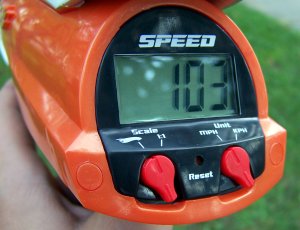
I experimentally determined the speed of my constant velocity car by timing it over a distance of two meters. I arrived at an average velocity of 0.157 m/s after three trials. With the radar gun set to scale speed (1/64) and kph I was able to get a reading of 35. Every time I did it I got 35 exactly. This converts to an actual speed of 0.15 m/s. If I use the 0.157 as the expected value I arrive at a percent error of 4.5%. I think that's Great!!!

Experiment #4: Real Velocity

Fresh off the constant velocity car I decided to try a real car. So I drove around the empty parking lot at my school and shot the light posts as I went by. I got the same reading as my speedometer every time.

Updated Conclusion:

The Hot Wheels Radar Gun works!!! At least for relatively constant velocity objects. I still need to determine how accurately it will measure velocity on an accelerating body.

Technorati Tags: , , ,

Saturday, September 09, 2006

HotWheels Radar Gun

UPDATE (7/20/08) - Please excuse me modifying my post some two years later, but This post sees a lot of traffic. I did more experimentation after I wrote this, for the full review follow this link.

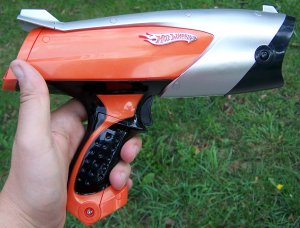
I just bought a Hot Wheels Radar Gun to see if it was at all useful in physics or physical science. The radar gun is hand-held. While it was designed for smaller hands than mine (go figure, 35 year old physics teachers aren't the target audience) it is still easy enough to hold and use. You have two unit settings kph and mph and you have the choice of getting straight speed or hotwheels car scale speed (1:64). I've of course been working in scale speed so I can be more precise (hopefully). When you pull the trigger you get a live readout of speed. When you let go it reports the maximum speed measured.

Experiment #1: Determining g using a falling object (a book)
  • I held the radar gun above the book pointed down
  • The book is held 2 m off the ground and dropped
  • Velocity is taken in kph with the scale speed setting (1:64)
  • Result - using the equation a=(v^2)/(2d) I get a value of 5.16 m/s/s. Only about a 47% error. (were shooting for 9.8 m/s/s)
Observations from Expt. 1
  • If the book drifts out of the radar beam I don't get really big numbers. I've done this same experiment using Vernier motion sensors and if your target moves out of the "beam" the floor is shot given the impression that the object "teleported" instantaneously to the floor resulting in a really big velocity.
  • The results are the same if the object is held really close to the gun as they are if you start further away. The Vernier motion sensor can't get a reading within 0.5 m or so.
  • It was really hard to get consistent results. Tow out of three results would be the same, but the third would be wildly different.
Conclusions from Expt. 1
  • The "reaction time" of the gun may be slow. This would explain the lack of teleportation velocity and may explain why I never got a true value for the maximum velocity of my falling object. It may very well be that the gun doesn't work well with accelerating objects and will give me more consistent results with constant velocity objects.
  • Next step - Try known constant velocity experiment.
Experiment #2: Constant velocity. While riding my son's scooter I have my GPS unit. The settings are mph (same as the GPS) and scale speed for greater precision. When in real speed, speeds are reported only to the nearest mile per hour.
  • Read GPS unit wile attempting to not fall off and not run my son down (while going between 8 and 9 mph).
  • My son shoots me with the radar gun staying in my path just long enough to get a good reading before diving to safety.
  • Compare the results.
Observations from Expt. 2
  • The results are much more consistent than in Experiment #1.
  • The numbers from the GPS unit and radar gun are fairly similar. It's tough to get a good reading from the GPS unit while not running my son down.
Conclusions from Expt. 1 and 2
  • My inital conclusions seem to be confirmed. A constant velocity seems to give a better answer. There was a 13% error between the radar gun and the GPS velocities. While this seems like a lot, I am not really concerned. I know neither the error rate of the radar gun nor the error in the velocity estimate of the GPS unit. The error inherent in both devices may be compounded. It is impossible to know without further testing.
  • The radar gun may in fact be not too bad. After the first experiment I wasn't so sure.
The Next Step - Run an experiment with both the radar gun and the Vernier motion sensor at the same time. I know the Vernier system works. This should give me enough data to confirm whether or not the Hot Wheels Radar Gun is worth anything. My feelings right now are it is worth the $30-35 spent, but only for measuring constant velocity. If you're planning on non-constant velocity this is probably not the tool for you. In the next week or two my classes will be doing a lab determining the terminal velocity of falling coffee filters. I'll make one group use the radar gun along with the vernier sensor. Unless I get ambitious between now and then and do it myself. Either way, I'll report the results here when done.

Technorati Tags: , , , , ,

Friday, August 18, 2006

Cheap Probeware

iScience Project is clearing out their stock of Serial Hobos for really low prices, but you have to act before August 25th, 2006.

Officially it's an Auction with a minumum bid of $18 for a kit or $35 for buy it now (normally $139/kit).

That buys you a small device (half the size of a deck of cards) that will record temperature, light, and humidity. It also comes with an external temperature probe on a 6' lead (so you can take two temps at the same time).

Hobo's are pretty cool. You plug them into the computer and use their software to set them up (what type of data to record and how often a reading is taken). Then you unplug it and leave it where you're collecting data. Once done you plug it back in and download the data to the computer.

These are cheap enough you could send them home with your kids for at home experimentation. There are hundreds of activities on the iScience Project page to use with Hobos if you can't think of any yourself.

They also have a loaner program so you can borrow Hobo's before you buy and there is usually some sort of contest you can enter to win a Hobo as well.

I've played with some Hobo's and will be more than happy to share my thoughts with you. AFAIK the serial ones are Windows only. They do sell USB ones that will work with Mac OS 10.2 or later (but they'er not super cheap right now)

Here's the info for the auction:


The Auction will begin now and end at 12 noon EST on Friday August 25, 2006. You will be notified by email within 24 hours 1) when you are the high bidder and 2) when you have been outbid. On Friday August 25 from 8AM until Noon (EST) you will be notified instantly. There will be a minimum bid of $18 per kit and $10 per individual HOBO to cover the cost of a new battery, shipping and the full 1 year warranty that will come with your HOBO. You can also use the “Buy it Now” option to own it immediately. All transactions must be on a Visa, Mastercard, AMEX or a school PO.

FAQ - What is demo stock at The HOBO Depot and Onset Computer Corporation? Any product that ever has been returned used or unused and any product that ever had a blemish or misprint on the casing. All of our demo stock has fully functioning components that we warrant for a full year. If any product is not working we guarantee we will replace it ASAP. All of these products come with a PC serial port connection and serial port cable (9 pin trapezoid). You would either need an available serial port (older computers have them) or a new serial to USB Keyspan adapter ($39 at any store that sells computers). All of these kits come with free PC Boxcar 4.3 software which is compatible with Win98 to WinXP and one free serial (9 pin) cable and one new battery.

So here you go - just put in your bid (minimum $18 for kits & $10 for the individual HOBO units).

#1) "Brand New" boxed serial HOBO Henry Kits - Minimum Bid =$18, My Bid =_$, or Buy it Now = $35 Each (Sells for $139) Includes (1) H08-004-02 HOBO data logger (Temp/RH/Light/Ext), (1) 6 Ft External Temp Cable, (1) PC Serial Cable, (1) HOBO Henry & Activity Book, 300 Labs on CD, (1) BoxCar PC Software

#2) Demo Serial Intro Kits - Minimum Bid =$18, My Bid =_$, or Buy it Now = $30 Each (Sells for $139) Includes (1) H08-004-02 HOBO data logger (Temp/RH/Light/Ext), (1) 6 Ft External Temp Cable, (1) PC Serial Cable, (1) BoxCar PC Software

#3) Demo HOBOs only - Minimum Bid =$10, My Bid =_$, or Buy it Now = $18 Each (Sells for $95) Includes (1) H08-004-02 HOBO data logger (Temp/RH/Light/Ext) or any HOBO on this web page and that is all. We assume you want the H08-004-02 unless you indicate differently. Great place to stock up on class sets.

#4) Demo External 6 Foot Temperature sensor TMC6- HA (same specs as TMC6-HD that replaced the HA) - Minimum Bid =$10, My Bid =_$, or Buy it Now = $18 Each (Sells for $30) Includes (1) TMC6-HA Sensor and that is all.

#5) Demo HOBO H9 Shuttle Data Transporters H09- 003-08 - Minimum Bid =$18, My Bid =_$, or Buy it Now = $30 Each (Sells for $159) Includes (1) H09- 003-08 HOBO H9 Shuttle Data Transporter - Perfect for collecting the data out in the field for up to 50 of your Demo HOBOs on one Shuttle (Palm like HOBO data storage).

Auction Contact Information
~~~~~~~~~~~~~~~~~~~~~~~~~~~~~~~~~~~~~~~~~~
email: rich@hobodepot.com
phone: 877-564-4377
web: http://www.hobodepot.com


Technorati Tags: , ,

Thursday, August 17, 2006

Got Mine Today!!!

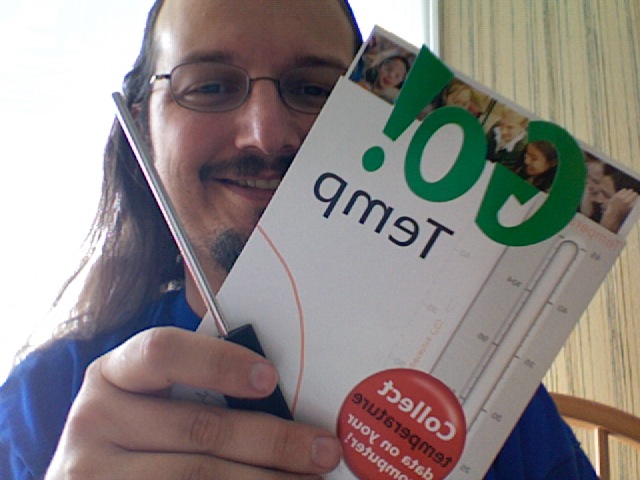
I blogged about Vernier giving away free Go!Temp USB temperature sensors a few months ago.

Well, mine was in my mail box at school when I checked today. I installed the software and was taking data in less than 5 minutes. It really is easy.

If you haven't done so already you should go to http://www.vernier.com/giveaway/ and register by August 31st, 2006. Registration takes about 1 minute (if you type slow).

An additional note. I took the picture with the camera built into my MacBook. Apparently it works like a mirror and inverts the image. I was going to fix it, but then It would have been less interesting to mention.

Technorati Tags: , ,

Sunday, May 07, 2006

One More Thing: Free Temp Sensor

At the MDE/COATT workshop I mentioned the possibility of a free EasyTemp. I was wrong it was a free Go!Temp. The Go!Temp doesn't plug into a calculator it plugs into the USB port on a computer.

In celebration for their 25th anniversary, Vernier is giving away one of these to every school in the USA. Just go to: http://www.vernier.com/giveaway/ and register by August 31st, 2006.

Friday, May 05, 2006

MDE/COATT Workshop

I don't tend to do traditional handouts when I give presentations. My handouts are typically digital. Here is the list of ideas and links I talked about at the May 5th workshop.

Porbeware - Allows you to collect actual data in real time. This often allows for experiments that would not be possible otherwise and allows for a greater deal of precision than previous methods would have allowed.
  • Vernier - Lab Pro: One of the Standards. They produce high quality products and have a wide variety of sensor available. The Lab Pro sensors are compatible with the CBL and CBL2
  • iSicence Project - HOBO: Offers a small, relatively inexpensive data logger for collecting environmental data. iScience project offers the chance to borrow HOBOs for classroom use and evaluation, There are also numerous opportunities to win free HOBOs.
  • Make Your Own: I've begun investigating other cheap/free probeware ideas. The focus around two free programs: Audacity and Visual Analyzer. These programs can be used with a microphone or solar cell to teach many concepts in sound, light, gravity, and periodic motion. I'm in the process of fully developing this idea. Once I do I'll make it widely available. For now you can look at previous blog entries on the subject: Sound, more sound, speed of sound, using a solar cell, solar cell part 2.
Video Analysis
  • Doane Physics Videos - A great source of physics videos in quick time format. The site also allows for the collection of position and time data from the movies using Flash.
  • Data Point - Data Point allows for collection of position-time data. These data are put in a text file that can be opened in Excel (or other spread sheet) to be graphed or manipulated. Works with *.avi files only.
  • LoggerPro - If you have Vernier Probeware you have this program already. You need at least version 3 in order to do video analysis. If you have a previous version of you can buy an upgrade for $50. If you are buying it new it is $159. The price includes the Site License which allows you to install it on every computer your school owns and every computer your students own! With LoggerPro you can analyze avi, mov, or mpeg movies. It will graph position and/or velocity. You can easily plot the slope of a line to see acceleration. You can show velocity vectors in the movie (need the free upgrade to ver. 3.4). It's really easy. An average freshman whose never seen the program will be up and running in under 10 min.
Digital Story Telling - Not just for Social Studies or English. Great way to create multimedia presentations to get out of the Power Point hole. You can do this with iMovie if you're lucky enough to work in a building that uses Macintosh computers. If you're like me you're stuck in Windows and iMovie is not an option.There are commercial solutions in Windows, but I'm going to talk about the free ones. You need WinXP (sorry)
  • Windows Movie Maker: Easy to use, drag and drop video clips and transitions. Will capture video from a camera if you have Firewire (IEEE 1394) or USB with some cameras.
  • Windows Photo Story: Great program for doing slide shows. I've had students use this for solar system and universe presentations. If I taught biology I could see using this to show change in biological systems over time (growth of a plant or emergence of leaves and flowers in the spring for example). It is easy, allows for voice over narration and a music track. You can also zoom in or pan across pictures. For some more info and links to tutorials check out my post from a couple weeks ago.
Out of this World Freeware - Check Back in a couple of days for links, I've run out of time.

Sunday, February 05, 2006

Do solar cells react fast enough?

A friend asked me this question when I shared my idea of using one as a light probe. I replied by asking are they fast enough for what?

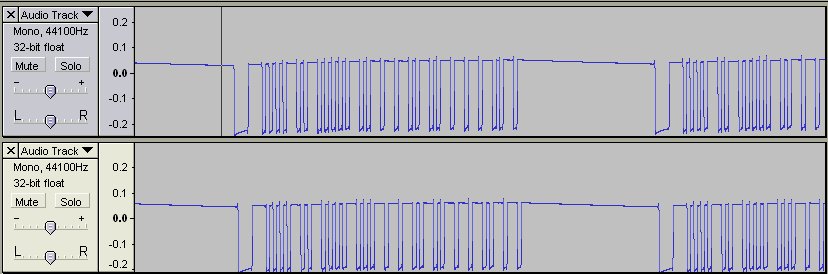
Here is my VCR remote control. The first track is channel up and the second is channel down. If you look close you can see differences in the patterns. The IR from the remote is easily picked up by the solar cell.

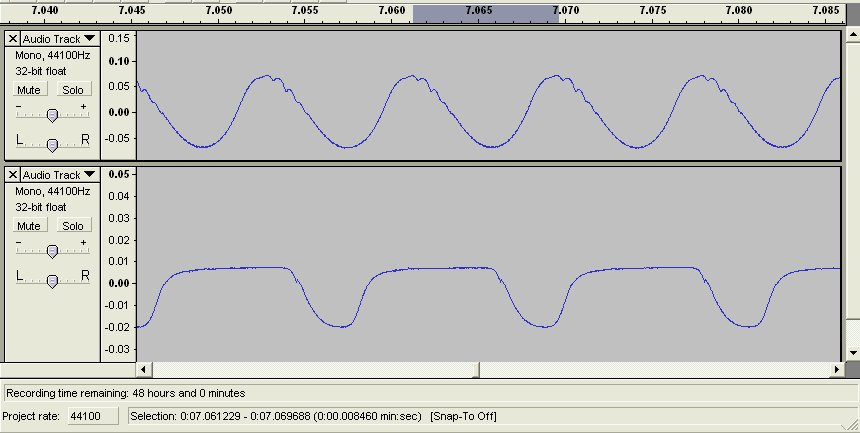
The second picture shows the fluorescent light in my basement and my computer monitor respectively. The monitor is set to 85 Hz, I was able to determine this in Audacity. Actually I got a value of 84.8 Hz, but I figure that's close enough.

Friday, February 03, 2006

On to light - More sneaky uses for free software

We started light this week in my physics class. I do a set of labs using CBLs (from TI) with the TI83/84 graphing calculators. We look at bulb wattage vs. brightness and distance vs. intensity (finding an inverse square relationship). I also have students see the fluctuations in a regular light bulb just caused by alternating current.

For those peope out there who don't have CBL's, LabPro's, or PASCO probeware all you need to do these labs is a cheap solar cell and a computer running Audacity and/or Visual Analyzer. You'll also need a 3.5 mm headphone jack. You can pick this up at Radioshack or you can go to the dollar store and pick up a cheap set of headphones.

Headphones will typically be stereo so there will be two leads, one for each ear. You only need one ear's worth of wire. When you strip the lead you will find two wires, solder one wire to each of the leads on the solar cell. Then simply plug it into the microphone jack on your computer and load up Visual Analyzer. Point the cell at a light and see the 60 Hz alternating current (shows up as the light turns on and off 120 times a second).

You can use this to determine relative intensity, but to get exact lumens or lux you'll have to find a way to calibrate your probe. You'll need a volt meter for this. You can find them for under $10 if you look around a bit (assuming you don't have any already).

The solar cell will also pick up infrared light. Just point a remote control at the cell and record in Audacity, zoom in to see how the pattern is different for different buttons and different remotes.

For under $5 you can have a very versitle light probe suitable for a number of great labs or demos.

Technorati Tags: , , ,

Friday, January 13, 2006

Teaching Sound

I'm finally up to teaching sound in my physics classes. This week we did a number of sound related labs/activities. One was determining the speed of sound using a long tube and a flat surface.

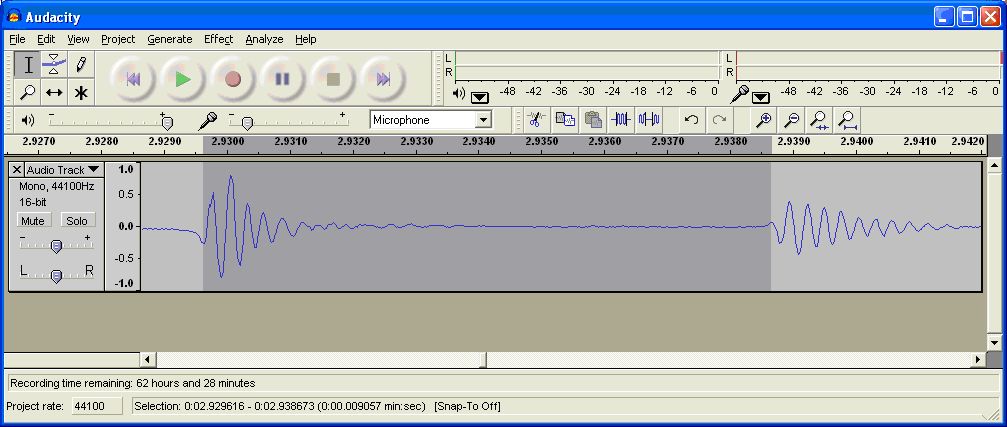
The tube (1.5 - 2 m) is stood up on a hard surface (tile floor). Using Audacity you can record a snap at the top of the tube and the echo of the snap off the floor. It's really quite cool. Once you zoom in quite a bit it looks something like this. I've written up fairly comprehensive instructions. If you have any questions or need further clarifications feel free to respond to this post.

Audacity Echo.pdf (Sorry, my link is broken. I'll fix the link to the document soon. Just drop me an email and I'll send you the directions)

Technorati Tags: , , ,